Webhooks
Receive events from external systems and turn them into agent reactions or fresh context, with signing-secret verification and an inspectable event history.
Overview
Webhooks let external systems push events into ArchAstro so your agents can react to them.
Use a webhook when:
- a third-party product (GitHub, Slack, or your own service) emits an event you want an agent to act on
- you want incoming payloads to become indexed context the agent can search later
- the trigger lives outside the platform and you would otherwise have to poll for it
The platform verifies every incoming request with a signing secret you set, so webhooks fail closed if a payload is unsigned, expired, or forged.
From external event to agent reaction
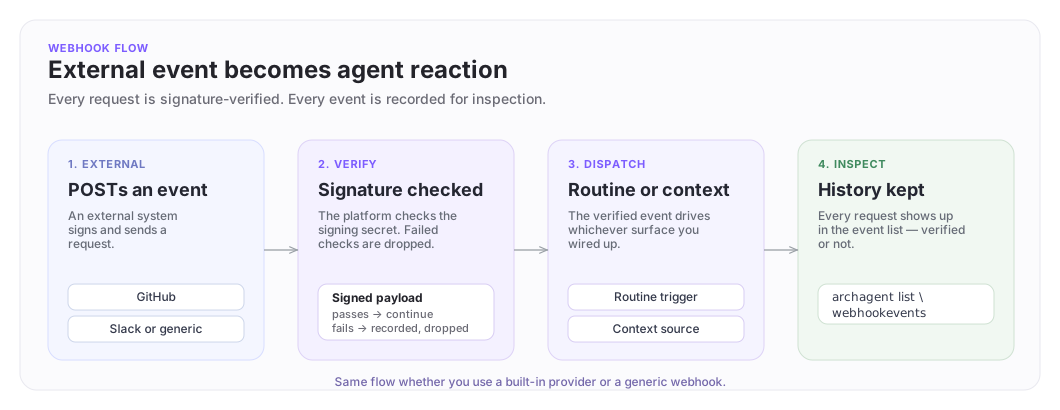
An external system POSTs to your webhook URL. The platform verifies the signature, dispatches to the routines or context source you wired up, and records the event for inspection.
Create a webhook
archastro create webhook \
 --provider github \
 --signing-secret <secret> \
 --enabled
Three fields drive the behavior:
| Option | What it does |
|---|---|
--provider <github|slack> |
Use a built-in provider's verification and event shape. The platform knows how to verify GitHub's X-Hub-Signature-256 and Slack's X-Slack-Signature headers. |
--lookup-key <key> |
For generic webhooks. Use any service you control, set the lookup key to something you can reference later (e.g. acme-billing). |
--signing-secret <secret> |
Required. The shared secret the sender uses to sign requests. Rotate it with update webhook -s <new-secret> whenever you rotate it on the sender side. |
Add --provision-context-source to auto-create an inbound context source connected to this webhook. Useful when the events should also become searchable context for an agent.
Inspect what you have:
archastro list webhooks
archastro describe webhook <webhook_id>
Inspect events
Every incoming request is recorded. Inspect the history when you are debugging "did the webhook actually fire?":
archastro list webhookevents --webhook <webhook_id>
The list shows arrival time, signature verification status, the event type, and any downstream dispatch outcome.
React to webhook events
Once a webhook is set up, an agent reacts in one of two ways:
- Trigger a routine. A routine with a webhook event type fires whenever a matching event arrives. This is the path for "do something when X happens upstream."
- Ingest into context. When you create the webhook with
--provision-context-source, payloads are also indexed as a knowledge source the agent can search later. This is the path for "make these events part of what the agent can see."
Both paths can run from the same webhook. Use the routine for the immediate reaction, and the context source for the long-term knowledge.
Update or delete
archastro update webhook <webhook_id> --enabled false
archastro update webhook <webhook_id> --signing-secret <new-secret>
archastro delete webhook <webhook_id>
Disabling is reversible; deleting is not. Disable first if you suspect a misbehaving sender: events stop dispatching but the configuration stays in place for inspection.
Security and signing
A webhook without a working signing secret is effectively a public POST endpoint, so every webhook in ArchAstro requires one and verifies it on every request. Failed verifications are recorded in the event list with an explicit failure reason; they never reach a routine or context source.
Generic webhooks and Automation ingress share one contract. Put a unique event id in X-Webhook-Event-Id (1 to 255 bytes after trimming) and sign this exact byte sequence as lowercase hex HMAC-SHA256 in X-Webhook-Signature:
<event-id-byte-length>
<event-id><raw-body>
A captured signature cannot be replayed with a different event id. HMAC of the raw body only is rejected. The webhook.external.{type} trigger uses event_type or type from the JSON body, not unsigned event-type headers.
Rotate the signing secret on the sender first, then update the webhook on the platform side. Until both sides agree, requests will be rejected, which is the correct fail-closed behavior.
Where to go next
- Installations: for OAuth-backed integrations (GitHub App, Slack, Gmail) that go beyond a single webhook URL.
- Knowledge: when webhook payloads should also become indexed context.
- Agents: for the routine model that dispatches off webhook events.
Need something clearer?
Tell us where this page still falls short.
If a step is confusing, a diagram is misleading, or a workflow needs a better example, send feedback directly and we will tighten it.